
# Decentralization Levels

## What decentralization levels of zkKYC does zkMe offer?

zkMe provides three levels of decentralization for zkKYC. The default level is [On-chain Mint](#on-chain-mint-default), please refer to the following description.

### On-chain Mint (Default)

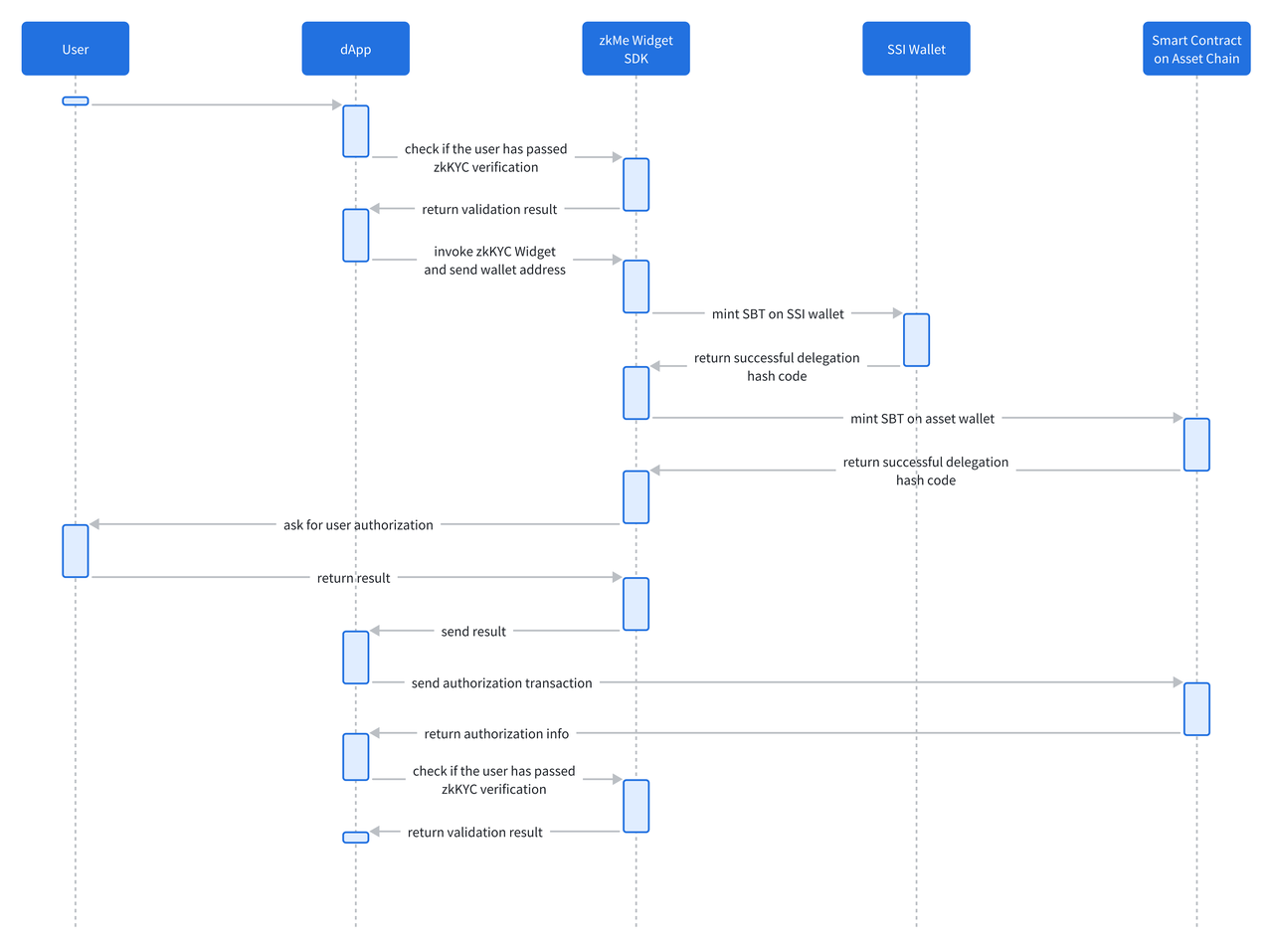
Upon the initial connection of the asset wallet to a chain, it includes the creation of an SBT on the user's SSI wallet on both Polygon and the chain user's wallet connect to, setting data on the SBT, minting the SBT on the blockchain that the user's wallet is linked to, and authorizing the project using the SBT minted on the connected asset chain.

However, to accommodate potential different needs from our clients, we also offer the following another methods, which is called [Cross-chain](#cross-chain).

### Cross-chain

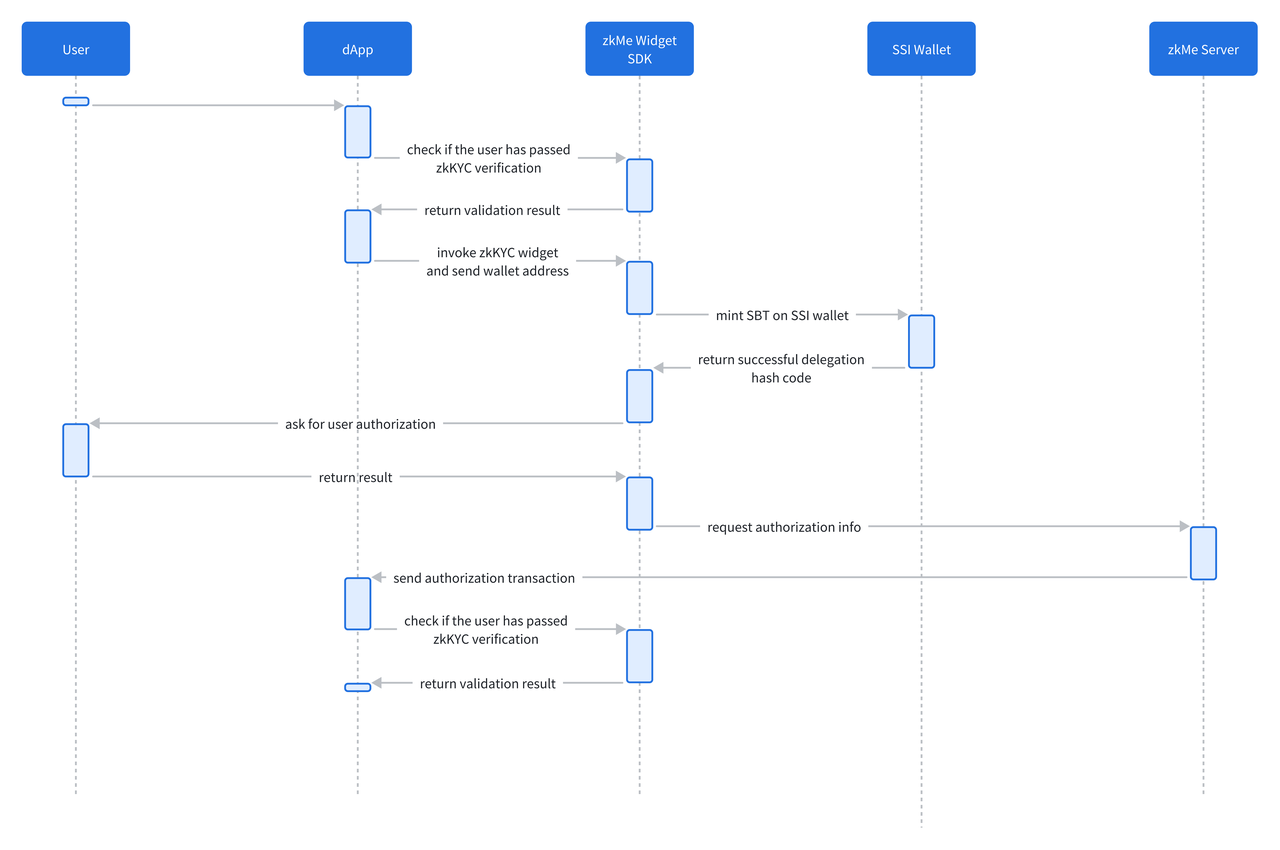
During the initial binding of the asset wallet to a chain, it includes creating an SBT on the user's SSI wallet on Polygon, setting data on the SBT, and obtaining user consent for authorization via a pop-up interface in widget. The user's authorization information is then transmitted to the project through zkMe's API.

***

## How do the three versions work?

After users complete the zkKYC process, then come to SBT minting and KYC status authorization stage.

### On-chain Mint (Default)&#x20;

**Interaction Instructions**

<figure><img src="https://content.gitbook.com/content/3QFkeleLOltSYnf8uj0t/blobs/HQDZqHPIfp008BkehxQS/Advance%20Interaction%20Instructions.png" alt=""><figcaption></figcaption></figure>

**How does it work?**

* For the initial binding of the mainnet asset wallet, the following are carried out:
  * Creating SBT in the user's Polygon Mainnet SSI wallet.
  * Setting data for SBT in the user's Polygon Mainnet SSI wallet.
  * Minting SBT on the chain user's wallet connects to.
  * Setting data for the SBT in the connected wallet.
  * User authorizes the minted SBT to the project on the connected chain.<br>
* If the user is binding an asset wallet on the testnet, the following are conducted:
  * Minting SBT on the chain user's wallet connects to.
  * Setting data for SBT in the user's testnet asset wallet.
  * User authorizes the minted SBT to the project on the connected chain.

**Flow chart**

<figure><img src="https://content.gitbook.com/content/3QFkeleLOltSYnf8uj0t/blobs/BqL9U7J4EkS3murq727F/Advance%20Flow%20chart.png" alt=""><figcaption></figcaption></figure>

### Cross-chain

#### Interaction Instructions

<figure><img src="https://content.gitbook.com/content/3QFkeleLOltSYnf8uj0t/blobs/PrQSnUZKiHsUgcRVvCpZ/Simple%20Interaction%20Instructions.PNG" alt=""><figcaption></figcaption></figure>

**How does it work?**

* For the initial binding of the mainnet asset wallet, the following are carried out:
  * Creating SBT in the user's Polygon Mainnet SSI wallet.
  * Setting data for SBT in the user's Polygon Mainnet SSI wallet.
  * User authorizes the permission of project side to compare their information
  * Project side can transmit information through zkMe's API<br>
* If the user is binding an asset wallet on the testnet, the following are conducted:
  * User authorizes the permission of project side to compare their information
  * Project side can transmit information through zkMe's API

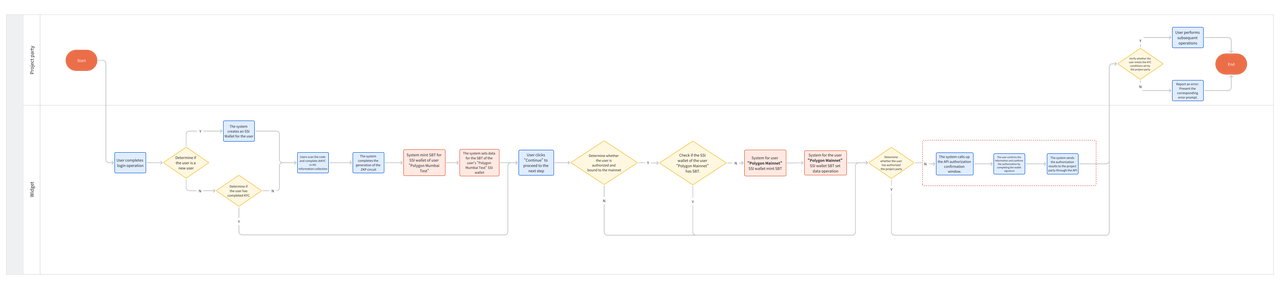
**Flow chart**

<figure><img src="https://content.gitbook.com/content/3QFkeleLOltSYnf8uj0t/blobs/94qaOFN1wwjuL88cpUa3/Simple%20Flow%20chart.PNG" alt=""><figcaption></figcaption></figure>

***

## Comparison of the two solutions

<table><thead><tr><th width="104"> </th><th width="128"> </th><th>On-chain Mint</th><th>Cross-chain</th></tr></thead><tbody><tr><td><strong>User Side</strong></td><td><strong>Binding Wallet with zkMe account</strong></td><td>Yes</td><td>Yes</td></tr><tr><td></td><td><strong>Where SBT(s) is minted</strong></td><td>Both Polygon and the chain user's wallet connect to</td><td>Only Polygon</td></tr><tr><td></td><td><strong>How a User Authorizes the KYC Status of A Project</strong><br><br></td><td>Mint SBT on the chain user's wallet connects to</td><td>Authorize via a pop-up window in the widget, where users decide whether to grant permission to a project</td></tr><tr><td><strong>Project Side</strong></td><td><strong>Configure Supported Networks in Dashboard</strong></td><td>Yes</td><td>No</td></tr><tr><td></td><td><strong>How to check the user's KYC status</strong></td><td>API and Smart Contract</td><td>API</td></tr></tbody></table>
